How to Use Zelle: Send and Receive Money in 6 Steps

Also in:Adulting

By ShowMeStepByStepPublished

Based on a video by Howfinity.

Zelle moves money instantly between US bank accounts. No waiting two or three days like with Venmo or Cash App cashouts - if both people use a Zelle-network bank, the money lands in the recipient's account within minutes. No cost either. Your bank covers the transfer.

This walkthrough from Howfinity uses the Chase mobile app as the example because Chase has Zelle built right in. Most major banks (Bank of America, Wells Fargo, Capital One, plus hundreds of credit unions) work the same way. If your bank isn't on the Zelle network, you can use the free standalone Zelle app and link a debit card instead. Same end result.

Three things to know before you start: you'll link a bank account, pick a person to pay, and pick the amount. Want to learn other ways to handle money basics? See how to deposit a check with your phone.

Step-by-Step Guide

1

Step 1: Open Your Bank App and Find Zelle

1:05
Step 1: Step 1: Open Your Bank App and Find Zelle

Open the mobile app for your bank. Zelle is built into hundreds of US banks and credit unions, so most people won't need a separate app. Chase, Bank of America, Wells Fargo, Capital One, Citi, US Bank, PNC, and Truist all have Zelle inside the app.

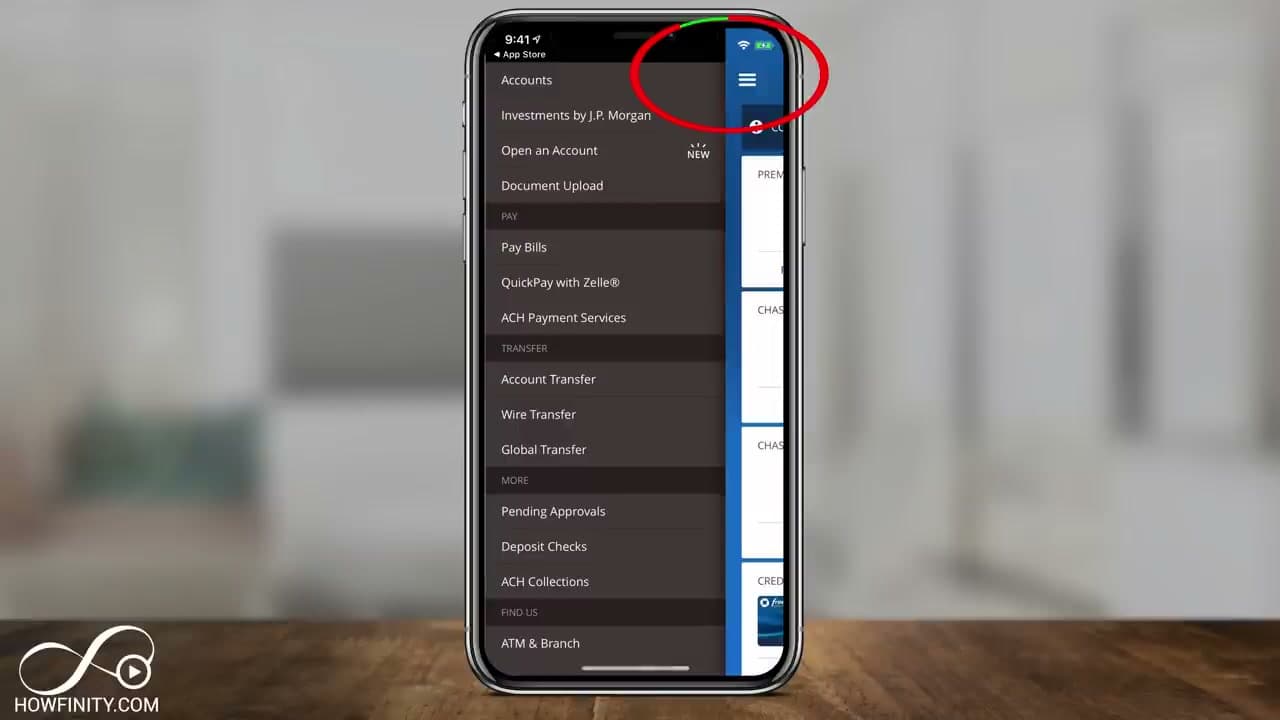
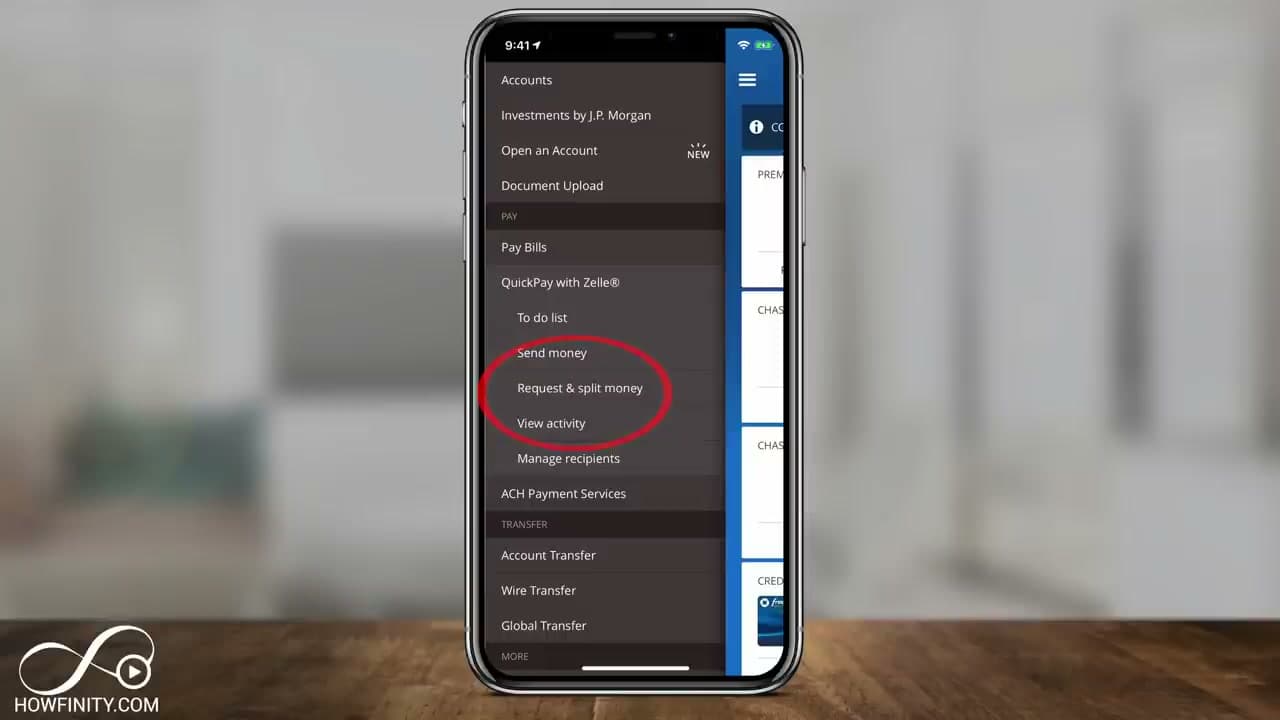
Look for the three-line menu icon in the top corner of your bank app and tap it. Find an option called Pay with Zelle, QuickPay with Zelle, or Send Money with Zelle. The exact wording varies by bank but the feature is the same. Not sure if your bank supports Zelle? Check the bank list at zellepay.com - it covers every supported bank and credit union.

2

Step 2: Tap Send Money and Add a Recipient

1:40
Step 2: Step 2: Tap Send Money and Add a Recipient

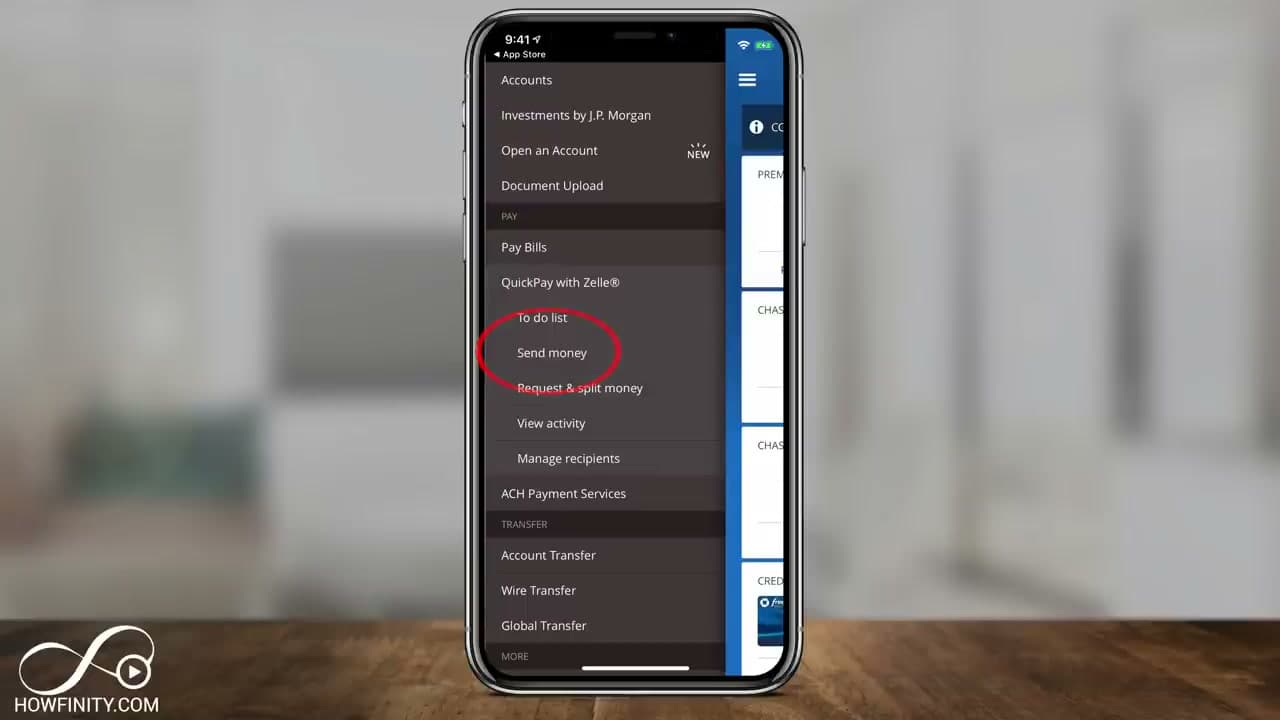
Tap Send Money under QuickPay with Zelle. You'll see three options inside the menu: send money, request money, or split a bill. The first time you use Zelle, your recent contacts list will be empty - that's normal.

Tap Add to add a new person. You can pull someone in from your phone contacts or type their name and contact info directly. Zelle only needs one of two things: the person's email address or their US mobile phone number. That's how Zelle finds them in the network.

3

Step 3: Enter the Amount and Pick Your Account

2:10
Step 3: Step 3: Enter the Amount and Pick Your Account

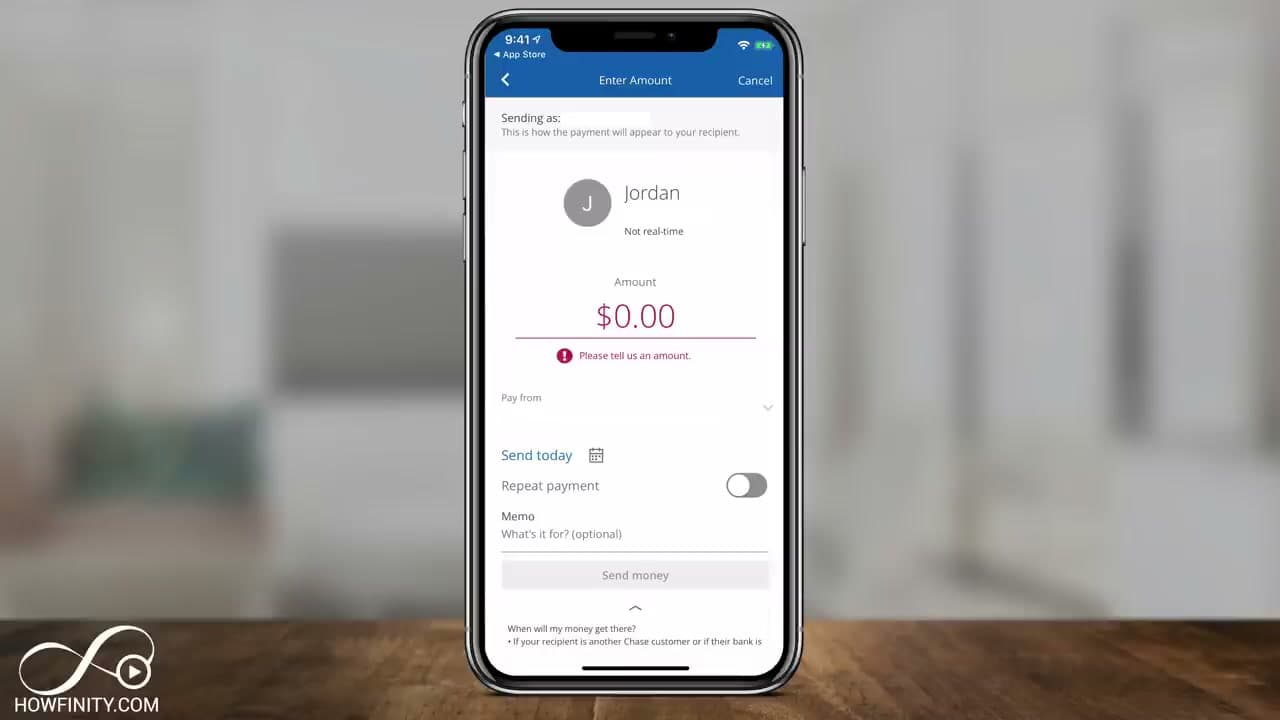
Type in the dollar amount you want to send. If your bank has more than one checking or savings account, tap the Pay From line to pick which one the money comes out of.

You can schedule the payment for today or set it to repeat weekly or monthly - handy for splitting rent with a roommate. Add a memo too if you want. Up to 200 characters explaining what the money is for. Tap Done when the amount looks right.

Tip

There's no fee to send money with Zelle when you use it through a bank that supports it. Daily and monthly send limits depend on your bank - Chase caps at $2,000 a day for personal accounts, Bank of America at $3,500. Check your bank's specific limit if you plan to send a large amount.

4

Step 4: Confirm the Recipient and Send

3:20
Step 4: Step 4: Confirm the Recipient and Send

Double-check the phone number or email address before you tap Send. Zelle payments cannot be cancelled or reversed once they go through. If you send $500 to the wrong number, that money is gone unless the stranger on the other end agrees to send it back.

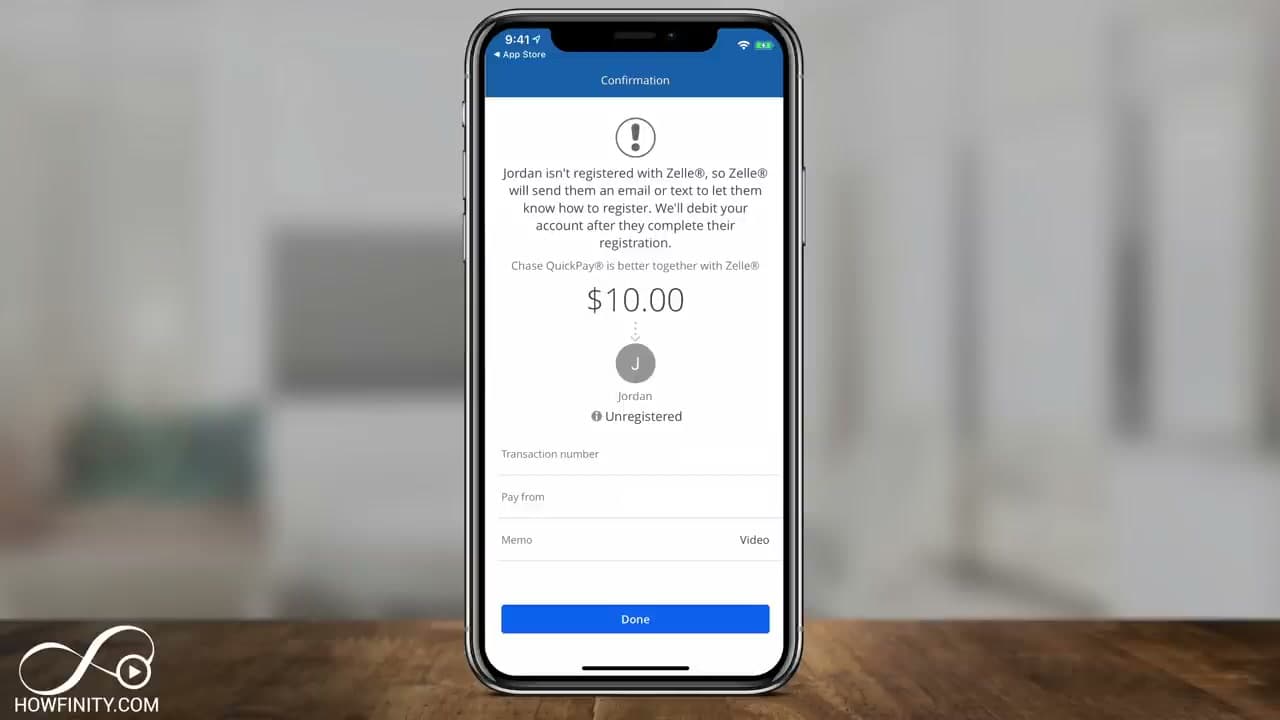
Use Zelle only for people you know and trust. Family, close friends, your kid's babysitter, your landlord. It is not built for paying strangers for goods or services - there's no buyer protection like Venmo Goods and Services or PayPal. Tap Send Money and confirm. If the recipient isn't registered with Zelle yet, they'll get a text or email showing them how to sign up and claim the money.

Products used in this step

5

Step 5: Request Money to Get Paid

3:30
Step 5: Step 5: Request Money to Get Paid

Receiving money works the same way as sending. Open QuickPay with Zelle again and tap Request & Split Money this time instead of Send Money. Pick the person from your recent contacts or add them by phone or email.

Type in the amount you're owed, pick the bank account you want the deposit to land in, and tap Request Money at the bottom. The other person gets a notification asking them to approve. Once they tap send, the money shows up in your account within minutes if their bank is also on the Zelle network. One or two business days if not.

6

Step 6: Use the Standalone Zelle App If Your Bank Isn't Supported

4:00
Step 6: Step 6: Use the Standalone Zelle App If Your Bank Isn't Supported

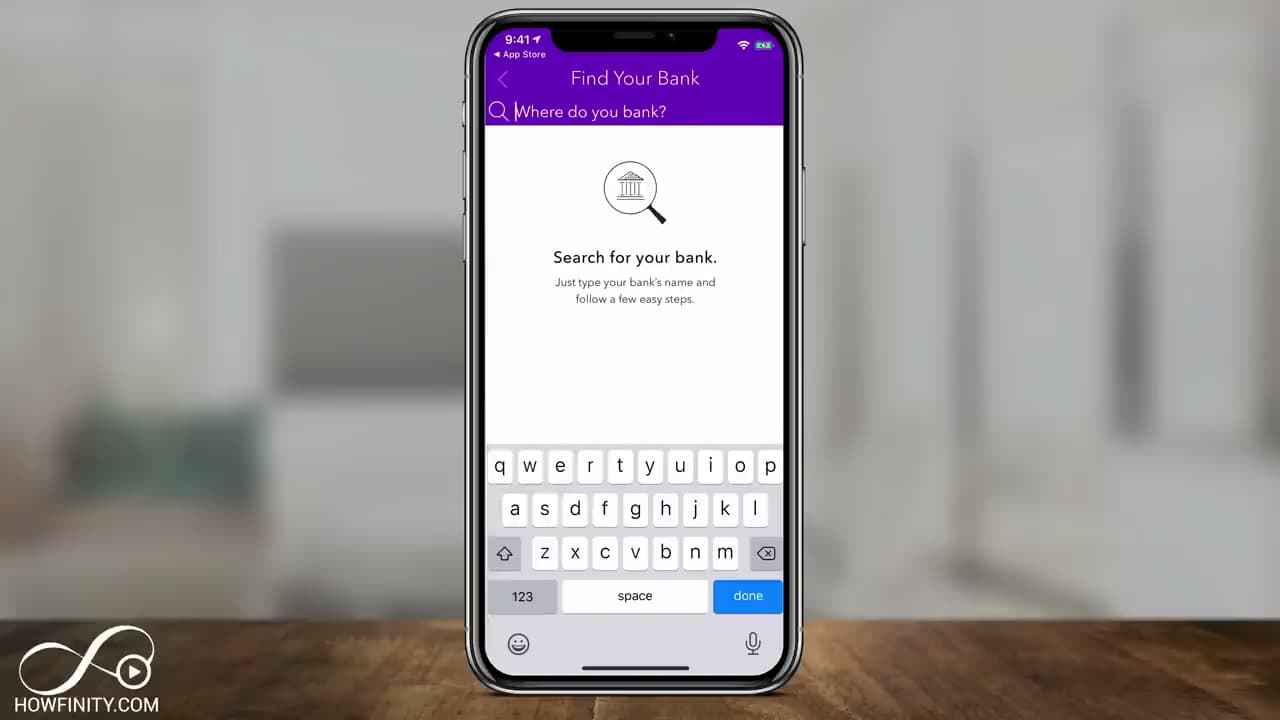
If your bank doesn't have Zelle built in, download the standalone Zelle app from the App Store or Google Play. Open it and enter your US mobile number to either sign in or sign up.

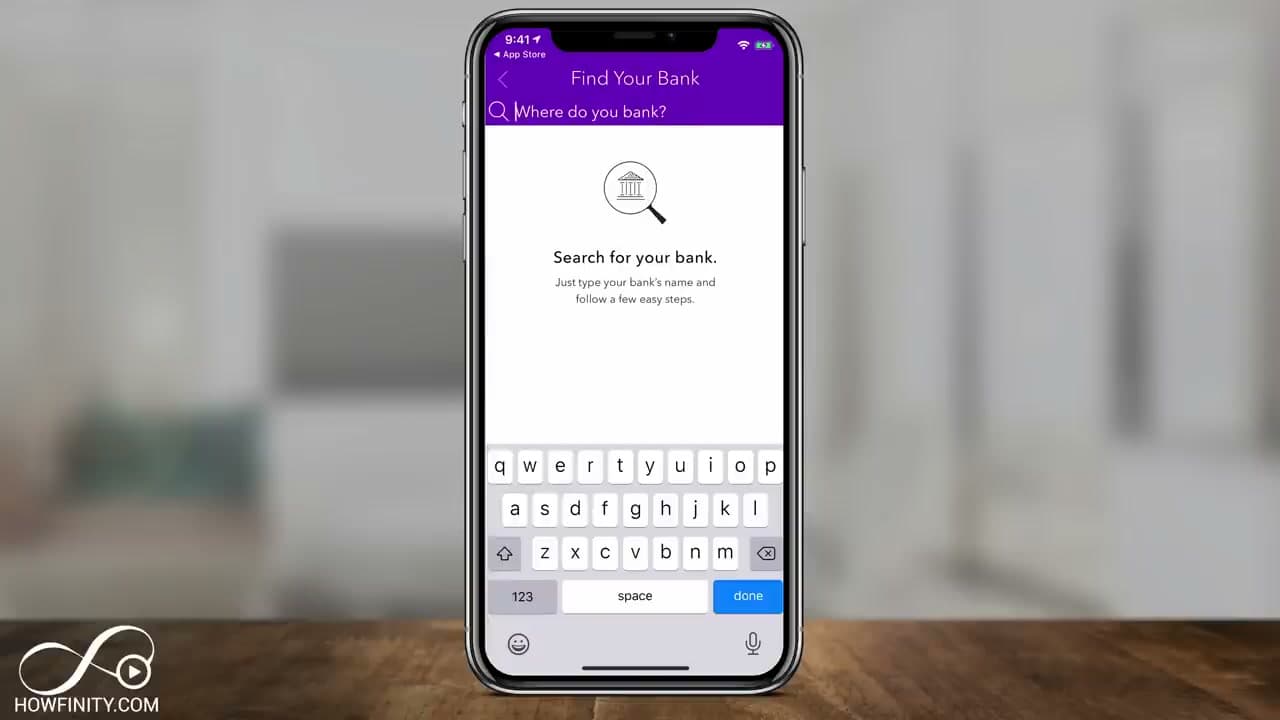
The app asks you to find your bank. Type the name - if Zelle finds it, the app sends you back to your bank's app to use Zelle there. If your bank isn't listed, tap Don't see your bank, enter your email for a verification code, and link a debit card to the standalone Zelle app instead. Sending and receiving work exactly the same as the in-bank version after that. Same speed, same limits, same trust rules.

Tip

The standalone Zelle app has stricter limits than going through your bank - usually $500 per week to send. If you plan to use Zelle regularly, getting it through a supported bank gives you higher limits and a cleaner experience.

Products Used

Your Guide

Howfinity

As an Amazon Associate we earn from qualifying purchases. Links on this page may be affiliate links - clicking them and buying doesn't change your price, but helps support ShowMeStepByStep.

Tags

Test your knowledge

Did the lesson stick? Find out in 2 minutes.

5 quick questions covering what you just read. No signup, no score saved — just a gut check.

Quick reference

Key takeaways from How to Use Zelle: Send and Receive Money in 6 Steps

5 questions, answers, and one-line explanations. Tap to expand.

  1. 1.How fast does Zelle settle between banks?

    Answer: Within minutes

    Within minutes when both banks are on the Zelle network. No cashout step like Venmo or Cash App.

  2. 2.What does Zelle need to find a recipient?

    Answer: Email or phone number

    Email address OR US mobile number is all Zelle needs - whichever they have linked to the network.

  3. 3.Can you cancel a Zelle payment after it sends?

    Answer: No - it's irreversible

    Once sent, gone. No way to claw back unless the stranger agrees to return it. Only use for people you know and trust.

  4. 4.Does Zelle offer buyer protection like PayPal?

    Answer: No protection at all

    No buyer protection. Built for paying family, friends, landlord, babysitter - not for buying goods from strangers.

  5. 5.What is Chase's daily send limit for personal accounts?

    Answer: $2,000

    $2,000/day at Chase. BofA caps at $3,500. The standalone Zelle app is stricter - typically $500/week.

What's next

Related collections

Curated theme pages that include this tutorial.

Weekly Digest

Liked this banking tutorial?

Pick the categories you want to hear about. Weekly digest of new step-by-step tutorials. No spam, easy unsubscribe.

Send me tutorials about

We only email about new tutorials. Easy unsubscribe anytime.