How to Sell on Facebook Marketplace

Also in:Adulting

By ShowMeStepByStepPublished Updated

Based on a video by Howfinity.

Most of us have spare stuff laying around the house - the bread maker that lives on top of the fridge, the kids' old bikes, the lamp from the guest room that nobody uses. Facebook Marketplace is the easiest place to turn any of it into cash. You don't need a seller account or a payment system. If you have a regular Facebook profile, you can list something in about five minutes.

This walkthrough shows the whole flow on a desktop computer: how to get to Marketplace, how to put up a listing with good photos, how to pick a price that actually sells, and how to set up the meet-up so you stay safe. The seven steps below mirror what Howfinity demonstrates in the source video.

If you're new to selling online, Facebook Marketplace is a softer landing than eBay or Mercari. There's no shipping to deal with, no seller fees, and buyers are usually within driving distance. It's a great first side hustle - and once you get the hang of it, you can branch out to opening an Etsy shop or starting a YouTube channel with the cash you've cleared from the garage.

Step-by-Step Guide

1

Open Facebook and Navigate to Marketplace

0:27
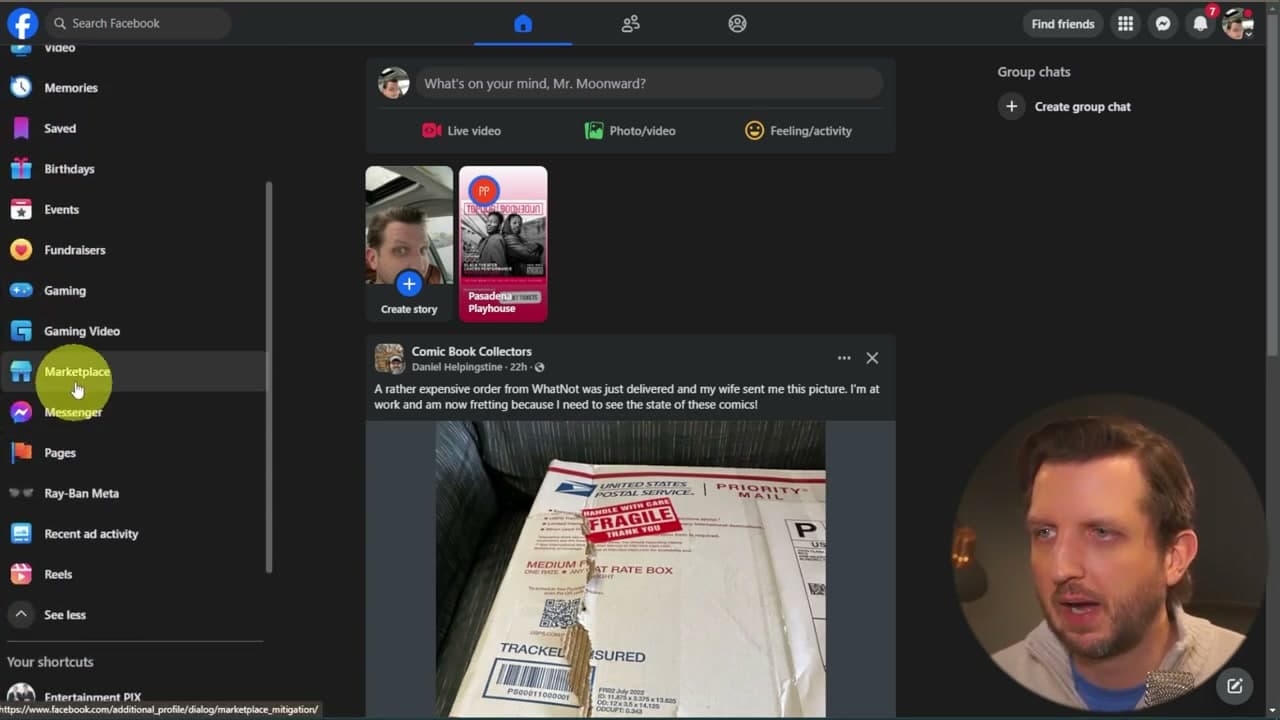
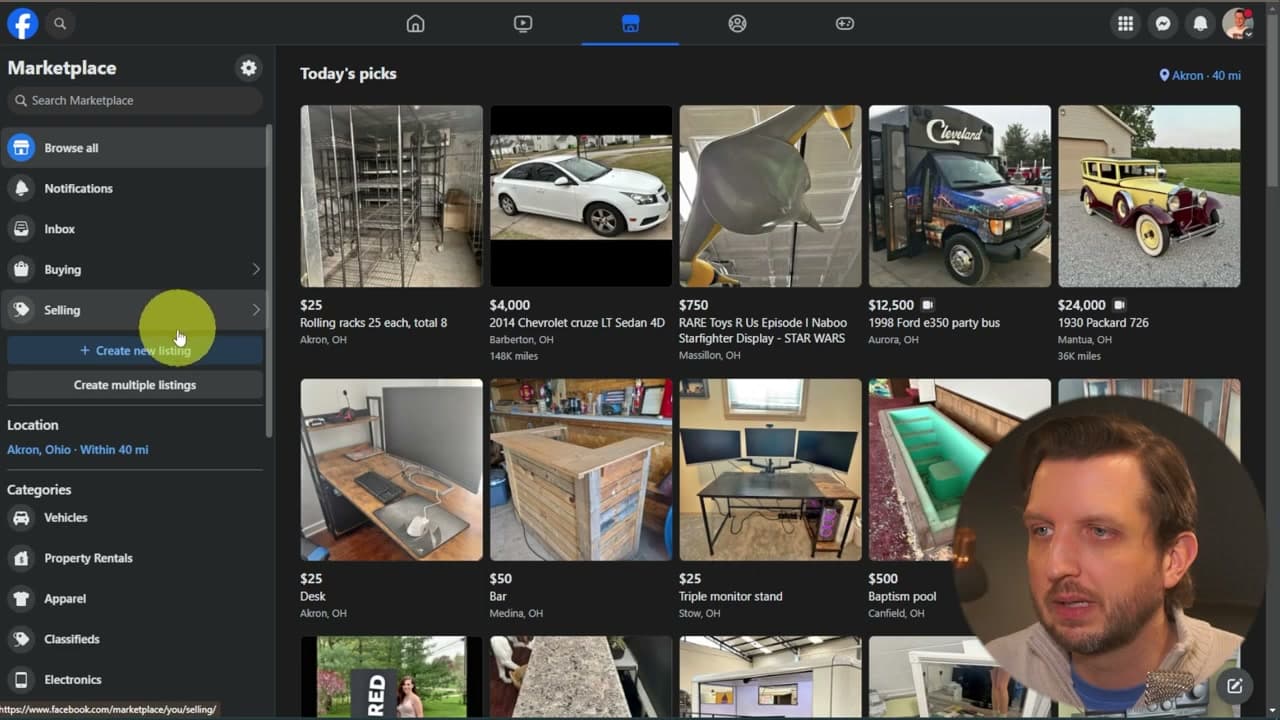
Step 1: Open Facebook and Navigate to Marketplace

Head to Facebook.com in your browser and log into your account. Look at the left-hand menu and find Marketplace. You may need to click See More to expand the menu before it shows up.

Click into Marketplace and you'll land on a feed of items for sale near you, sorted by location. The Marketplace tab also lives at the top of every Facebook page once you've used it the first time, so you can get back faster next time.

Tip

Set your location in Facebook before you start. The buyers you want are the ones close enough for a quick pickup, not the ones two states away who'll never actually show up.

2

Click Create New Listing and Choose Items for Sale

0:40
Step 2: Click Create New Listing and Choose Items for Sale

From the Marketplace home page, click the blue Create New Listing button on the left side. Facebook gives you a few options: Items for Sale, Multiple Listings, Vehicle, or Home for Sale or Rent.

For everyday household stuff - the spare items most of us are trying to clear out - pick Items for Sale. Vehicles and real estate have their own forms with extra fields like VIN numbers or square footage. If you have a bunch of similar items, Multiple Listings lets you post them in one batch.

Tip

If you're selling a lot of the same thing (clothes, books, kids' toys), use Multiple Listings to save typing the same info over and over.

3

Upload Photos and Write a Searchable Title

1:25
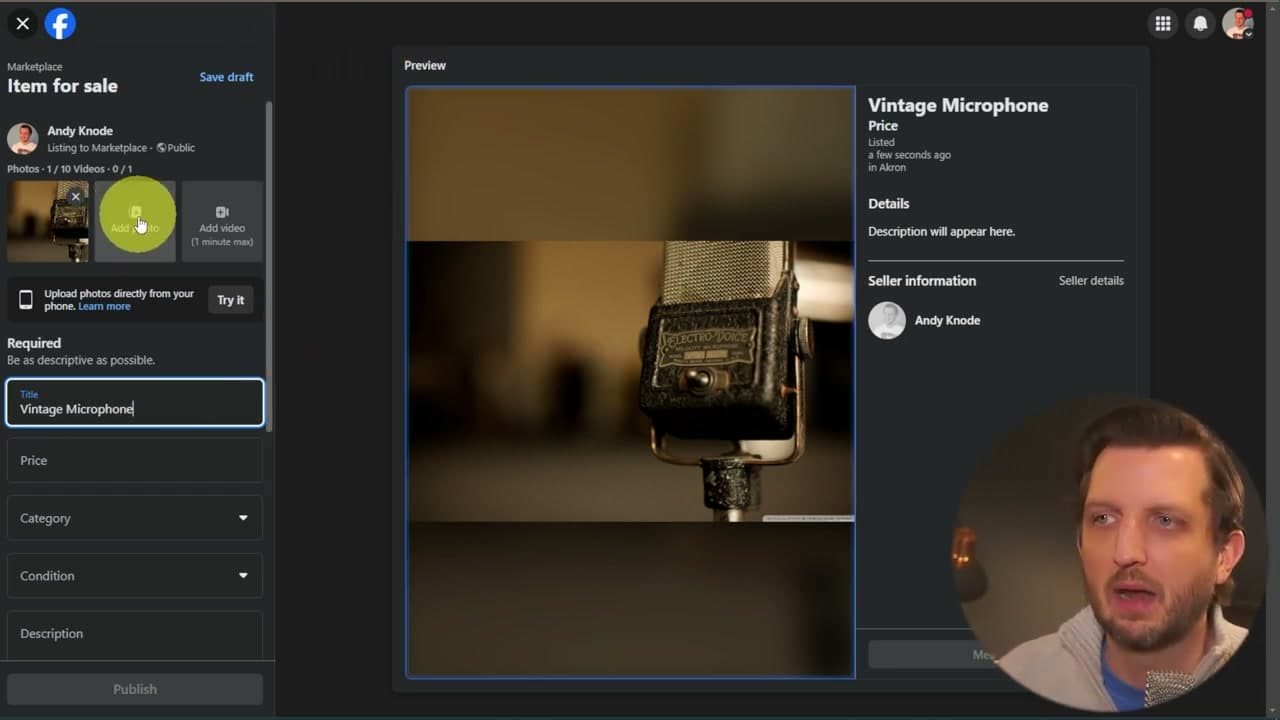
Step 3: Upload Photos and Write a Searchable Title

Add at least one photo, but more is always better. Buyers scroll fast and good pictures stop the scroll. You can also add a short video if it helps show condition or scale. Facebook lets you add up to ten photos per listing.

For the title, lead with the words buyers actually type into the search box. "Vintage Microphone" beats "Cool old mic" every time. Be specific - include brand names, sizes, colors, model numbers. Look at the title like you're the buyer typing into the search bar.

Tip

Shoot in natural light against a clean background. Take photos from multiple angles plus close-ups of any flaws so buyers trust you. A short phone video showing the item from all sides cuts down on "can you send more pics" messages.

4

Set Price and Pick the Right Category

1:45
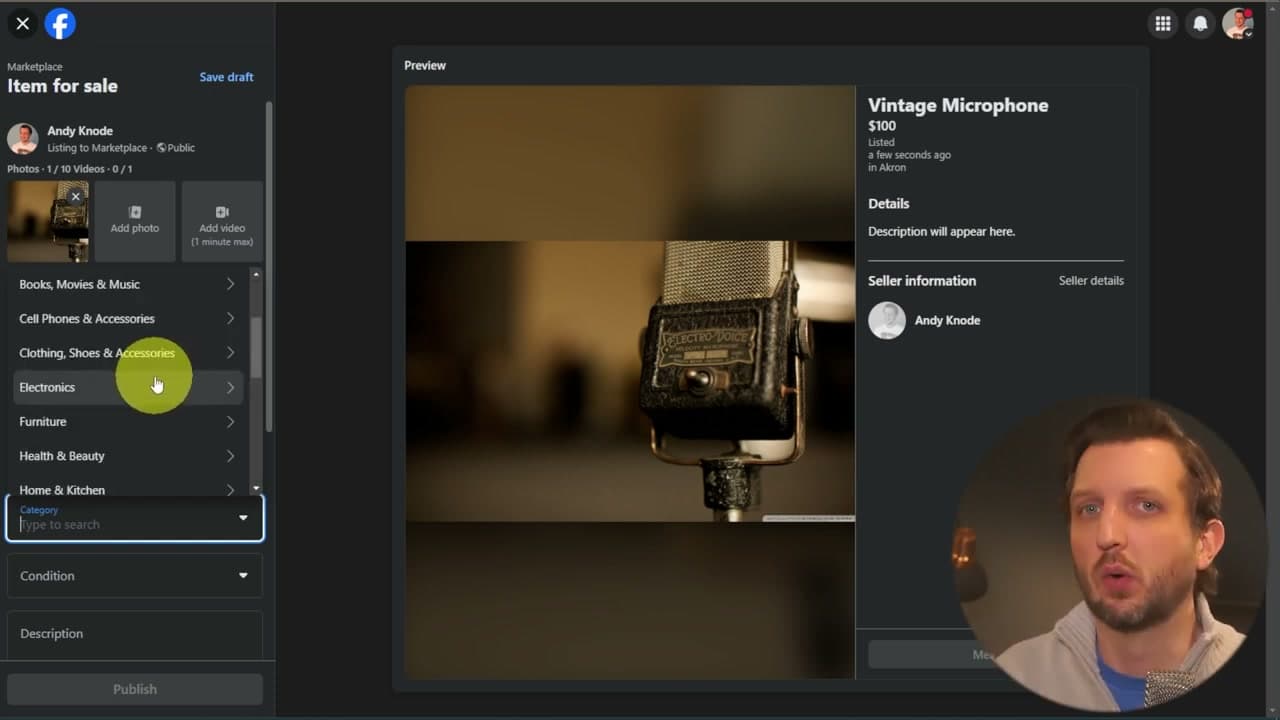
Step 4: Set Price and Pick the Right Category

Enter your asking price in the Price field. Then open the Category dropdown. Facebook has dozens of categories - Antiques and Collectibles, Electronics, Furniture, Home Goods, Cell Phones, Office Supplies, and many more.

Pick the one closest to your item. If a subcategory fits even better, drill down into it. Buyers browse by category as much as they search by keyword, so picking the right one puts your listing in front of the people most likely to buy.

Tip

Before you set a price, search Facebook Marketplace for similar items in your area. See what they're listed at, then price yours slightly under the average if you want a quick sale. Price higher if you're patient.

5

Set Condition and Write a Detailed Description

2:20
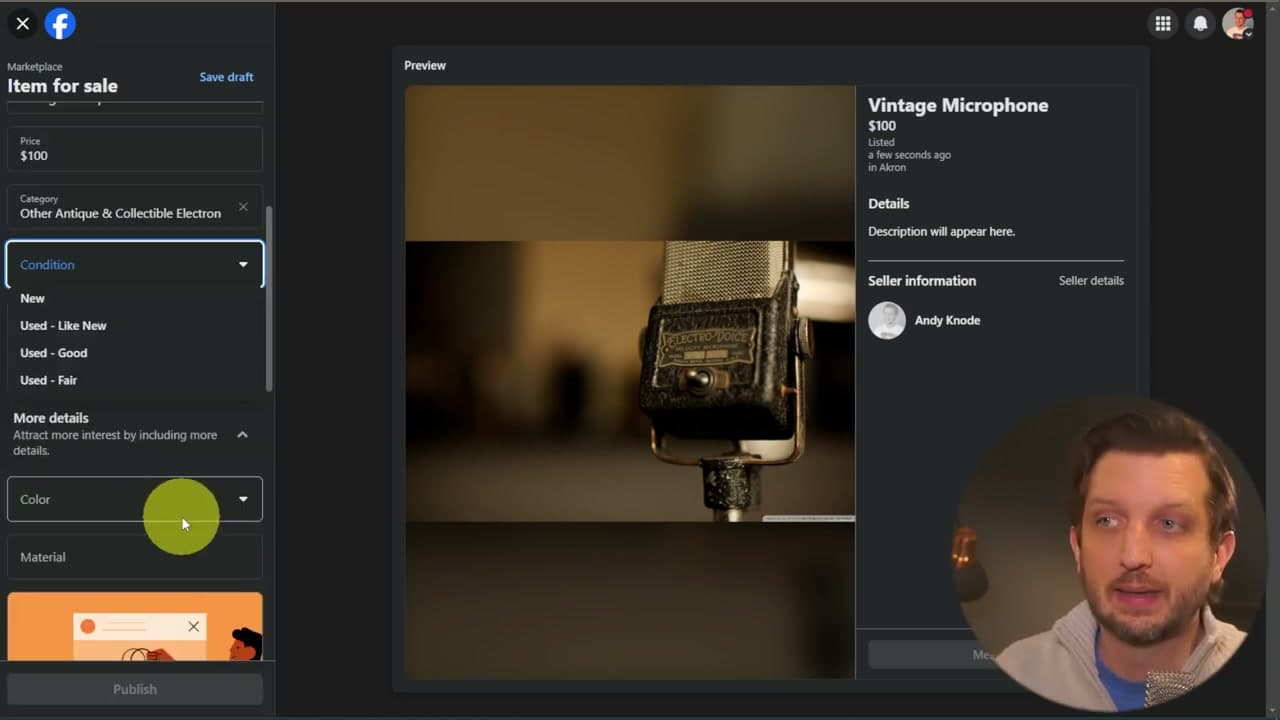
Step 5: Set Condition and Write a Detailed Description

Pick a condition: New, Used Like New, Used Good, or Used Fair. Be honest. The old rule applies - under-promise and over-deliver. If it's scratched, say so. Lower condition expectations mean fewer messy meet-ups where the buyer shows up, looks at the item, and walks away.

Then write a description that covers the details a buyer would ask about: size, age, what's included, what's missing, why you're selling. Good descriptions cut down on repetitive messages later. You can also add a SKU, personalization options, or a color or material - they're all optional but they help your listing show up in filtered searches.

Tip

Save your description as a draft template if you sell a lot of similar items. "Used in fair condition. Great for [use case]. Comes from a smoke-free, pet-free home." Tweak the specifics each time.

6

Set Safe Meet-Up Preferences

3:15
Step 6: Set Safe Meet-Up Preferences

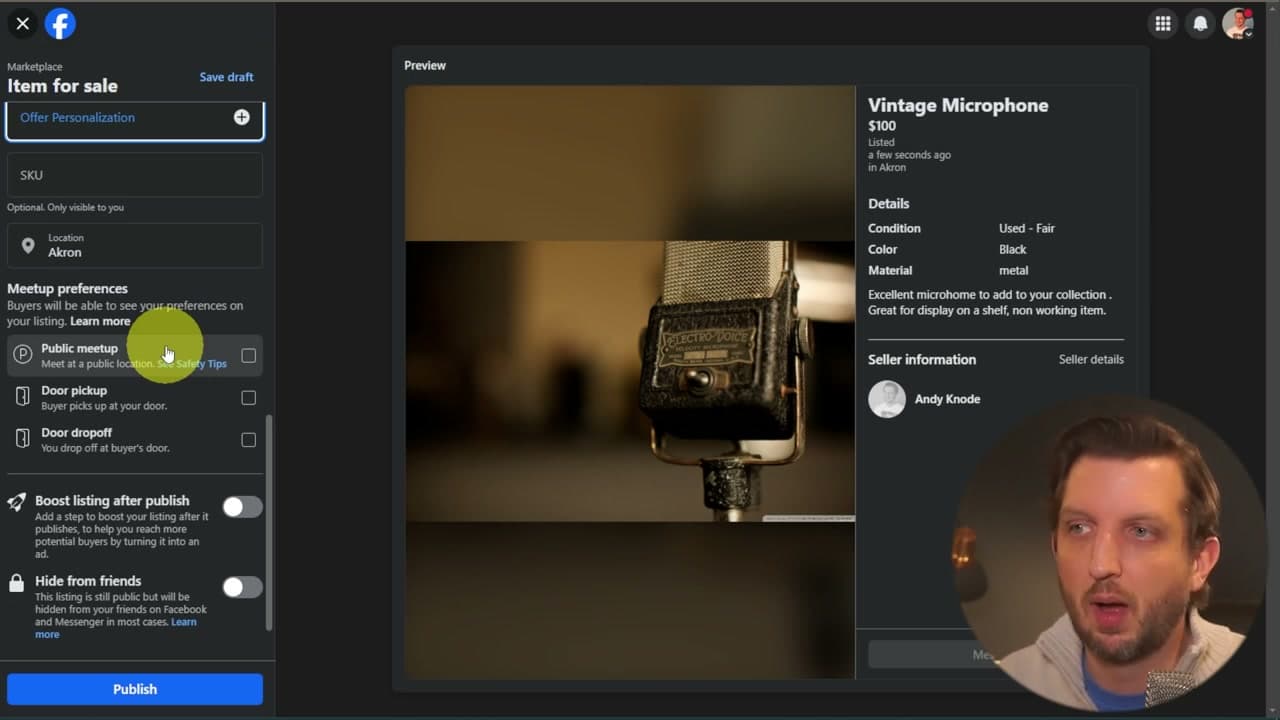
Scroll down to Meetup Preferences. Choose how you want to hand the item over: Public Meetup, Door Pickup, or Door Dropoff. For anything that involves meeting a stranger, pick Public Meetup.

A busy parking lot in the middle of the day - Walmart, a grocery store, a bank - is the safest call. Never give out your home address in the listing itself. If the buyer asks for your address up front, that's a red flag. Stick to the meetup spot you chose and bring a friend if the item is expensive or you're meeting in the evening.

Tip

Many police stations now have designated 'safe exchange zones' with cameras in the parking lot. Use one for higher-value items. They're listed at safetradestations.com.

7

Publish and Manage Your Seller Dashboard

4:00
Step 7: Publish and Manage Your Seller Dashboard

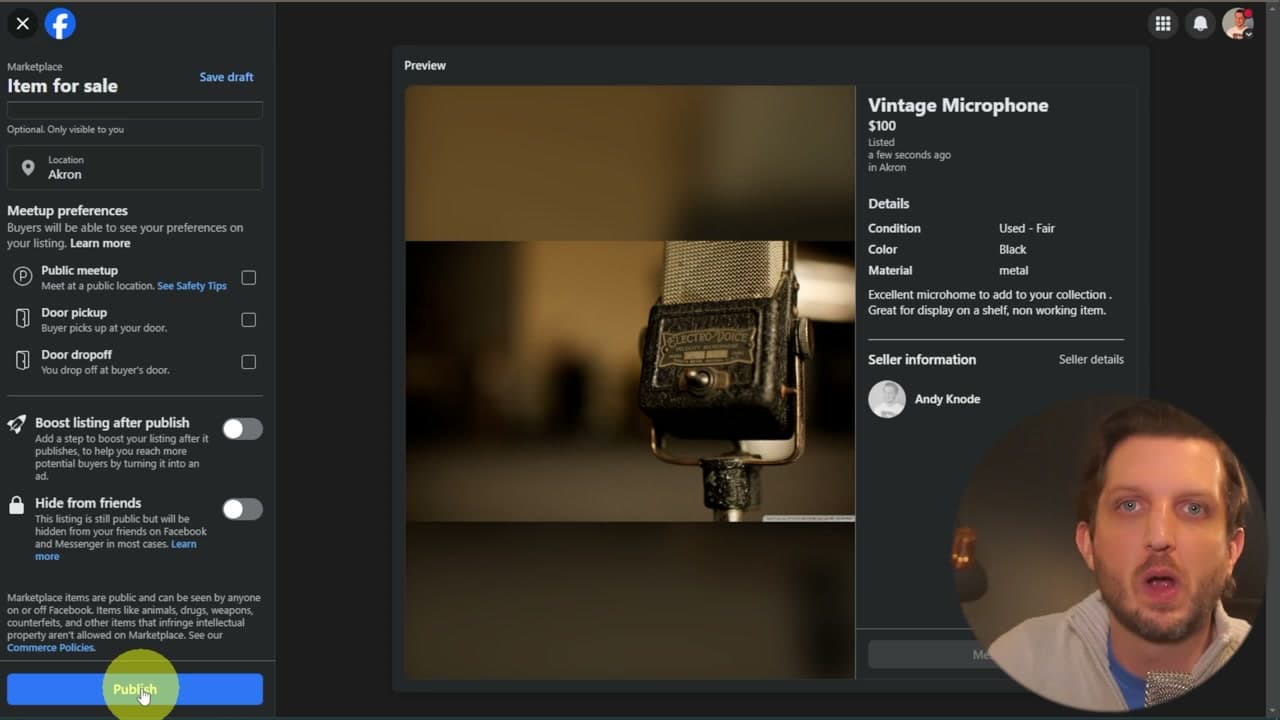
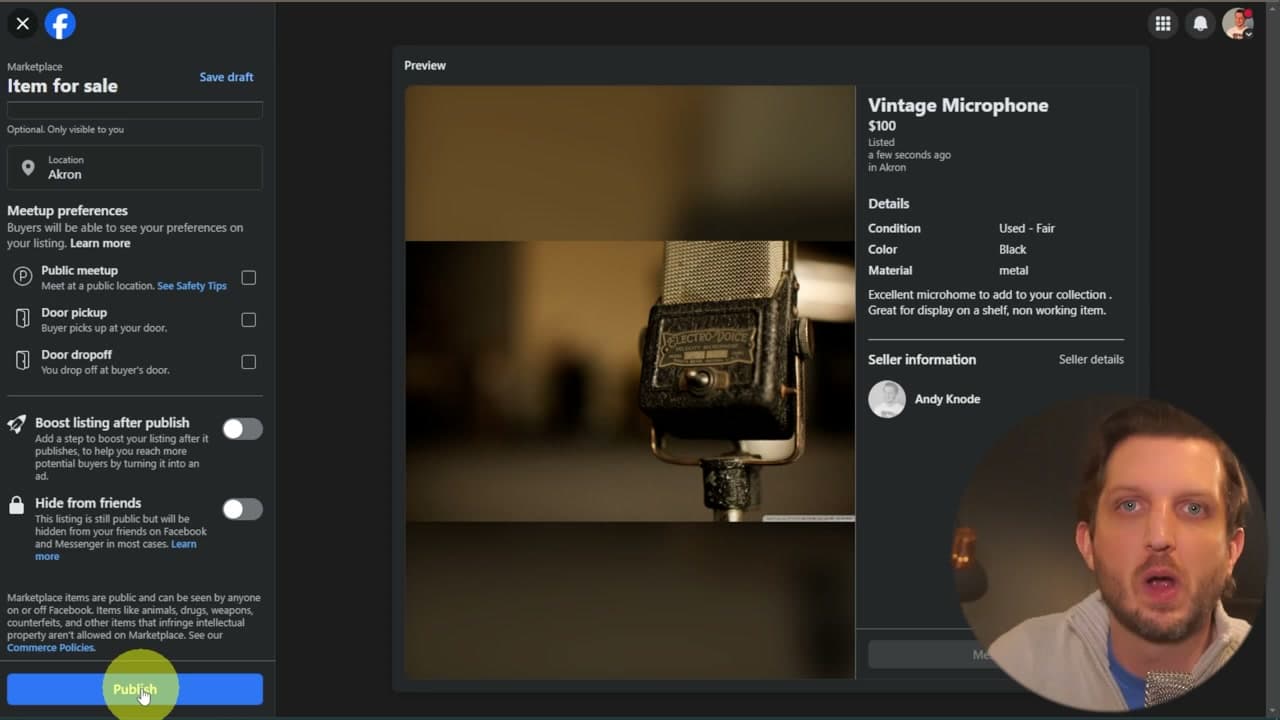
Click the blue Publish button at the bottom of the form. Facebook takes a few minutes to make your listing live. You can also toggle Boost Listing if you want to pay to put it in front of more buyers, or Hide From Friends if you'd rather your social circle didn't see what you're selling.

After that you'll see your listing under Your Listings, and the Seller Dashboard shows incoming chats, ratings, and how each listing is performing. If you keep getting the same question - "Does it come with the cord?" - edit the description so you stop having to answer it. Respond to messages fast; Facebook's algorithm rewards active sellers by pushing your listings higher in buyer feeds.

Tip

Mark items Sold (not just delete them) when they go. It builds a track record on your seller profile and makes future buyers more comfortable trusting you.

Products Used

Your Guide

Howfinity

As an Amazon Associate we earn from qualifying purchases. Links on this page may be affiliate links - clicking them and buying doesn't change your price, but helps support ShowMeStepByStep.

Tags

Test your knowledge

Did the lesson stick? Find out in 2 minutes.

5 quick questions covering what you just read. No signup, no score saved — just a gut check.

Quick reference

Key takeaways from How to Sell on Facebook Marketplace

5 questions, answers, and one-line explanations. Tap to expand.

  1. 1.When writing the listing title, what's the right approach?

    Answer: Lead with the words buyers actually TYPE into the search box ('Vintage Microphone' + brand + size + color)

    Searchability wins on Marketplace; specific keywords beat clever copy.

  2. 2.How many photos can you add per listing?

    Answer: Up to 10

    Up to 10 photos per listing; more is almost always better because buyers scroll fast.

  3. 3.Why pick the right CATEGORY (not just rely on the search keywords)?

    Answer: Buyers BROWSE by category as much as they search by keyword - the right category puts you in front of the right shoppers

    Category browsing is a significant chunk of buyer behavior; pick the closest fit.

  4. 4.What's the safest meet-up choice for meeting a stranger?

    Answer: Public Meetup in a busy parking lot during the day (Walmart, grocery store, bank)

    Public daytime meetups with witnesses keep both sides safe. Never share home address in the listing.

  5. 5.What's the rule of thumb for setting buyer expectations?

    Answer: Under-promise and over-deliver - be honest about scratches, missing parts, wear

    Under-promise + over-deliver = fewer wasted meet-ups where buyers walk away.

What's next

Related collections

Curated theme pages that include this tutorial.

Weekly Digest

Liked this side hustles tutorial?

Pick the categories you want to hear about. Weekly digest of new step-by-step tutorials. No spam, easy unsubscribe.

Send me tutorials about

We only email about new tutorials. Easy unsubscribe anytime.